 ArtVul
www.artvul.comOverview
Creating visuals usually means jumping between tools: one for images, another for logos, another for video. ArtVul puts them in one studio. Each tool is built for one job, with presets and the right AI model behind it, and everything it makes lands in one gallery.
Main Features
- Image
- General: generate images, edit them, or compose new ones from several reference images
- Logo: a full logo system (mark, wordmark and combined), as SVG and PNG
- YouTube thumbnail: built for clicks, with style presets and a face reference
- Video
- Product ad: build a product video ad on a node canvas; each pair of keyframes becomes a segment, and the segments are stitched into one ad
- YouTube background: still images or looping videos for a video's background, up to 4K, in dozens of styles
- Prompt help: AI suggests prompts and reads reference images
- Gallery: everything generated, in one place
- Showcase: a public page of selected work, managed from an admin page
- Invite-only access with Google sign-in
Structures
- 2 Repositories
- api
- web
Tech Stack & Libraries
| Layer | Built with |
|---|---|
| Web | Next.js 16 · React · TypeScript · Tailwind CSS · shadcn/ui |
| Backend | Node.js · Express · TypeScript · sharp · FFmpeg |
| AI models | fal.ai: FLUX.2, GPT Image 2, Wan 2.7, Recraft V4.1, Kling 3, MiniMax · Fireworks: Kimi K2.5 for prompt help |
| Data and login | Supabase (Google sign-in, gallery, showcase) |
| Tests | Vitest |
Architecture
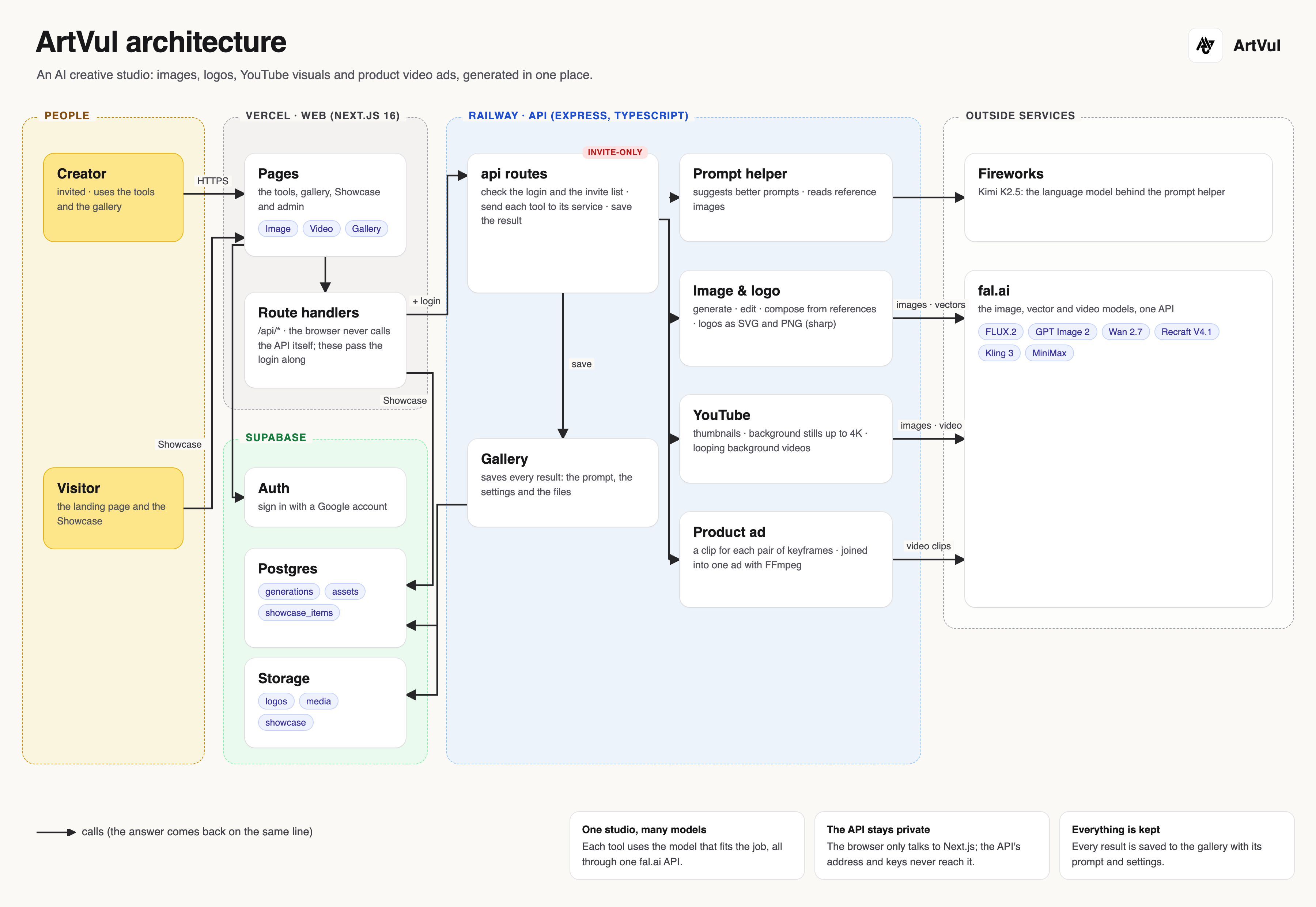
Arrows are calls, and the answer comes back on the same line.
UI Interfaces
ArtVul
Image
YouTube
Product ad
Gallery
Product ad: the video
Wallet: Wallts.