 Ravaka
ravaka.xyzOverview
Ravaka is an always-on personal AI agent platform: bots you message like a colleague, that own a persistent cloud computer, remember how you work, learn repeatable routines, and keep working after you close your device.
Main Features
- Chat
- Message a bot like a colleague — answers stream in word by word
- Close your laptop mid-answer; the bot keeps working and the reply is waiting
- Stop a running bot cleanly at any point; Reconnects on its own after a dropped network
- Formatted replies: tables, code with syntax colouring, mathematics
- See the model's thinking above its answer, closed by default and timed.
- @-mention a plugin to point the bot at it for one message.
- Every conversation per bot in History; a half-typed message waits where you left it.
- Bots
- Create as many as you like, each with its own name, instructions and face.
- Faces show live state in the sidebar: working, needs you, idle.
- Any model at any provider (OpenRouter or Vercel AI Gateway), searchable, with price per million tokens and context size.
- Models that can't use tools are marked before you pick one
- A privacy badge shows whether the gateway was asked to keep nothing
- Built-in tools — granted per bot, one at a time; a bot starts with none
- Grouped: Web (search, read), Browser (open, click, type, screenshot), Files & commands (read, write, run, hand over), plus plugins.
- A new bot starts with web search; other groups load only when needed, so answers stay fast.
- shell_exec takes an argument list, never a shell string, with a timeout always enforced; files stay inside /workspace
- Asks before acting
- Approval cards show exactly what will be posted before anything leaves.
- When a request is unclear, the bot asks a question with answers to click.
- Decisions stay in the thread as a record.
- Work that takes time
- Slow jobs, such as image generation, run in the background; the answer arrives when done.
- Finished files are handed over in the chat to download (up to 50 MB each, 1 GB total).
- Memory
- Remembers facts, events and open loops across conversations without being reminded.
- Browse, search, correct or forget anything it believes about you, with where it learned it.
- Skills
- Reusable procedures in the open SKILL.md format: write one or import one.
- Versioned, and each bot is pinned to the version it uses.
- Its own computer
- A real Linux machine per person, shared by your bots: shell, files, browser, desktop.
- Files persist between conversations; plain-language status and a storage meter.
- Watching it work
- Live view of the bot's desktop beside the conversation, or full screen.
- Take control: the bot stops first, then the keyboard is yours. Give it back and it resumes.
- When a site needs a human (a login, a robot check), the bot pauses and asks you to take over.
- What it may reach
- Bots reach only the websites you allow; everything else is refused at the network.
- Blocked sites are shown under the reply; Allow asks first, then the bot tries again.
- A "Recently refused" list shows what your bots tried to reach.
- Plugins
- A reviewed catalogue: GitHub, Tally, fal, OpenAI Developer Docs, DeepWiki, Context7 (49 tools).
- Connect with a key or OAuth; the credential is sealed and opened only at the moment of use.
- Paid plugins spend within limits you set per call, per day and per month.
- The app
- Sign in without the app ever holding a password
- Session in the macOS Keychain
- Light, dark, or follow the system
- Per-run cost recorded
- Every screen reachable from the keyboard
- Under the hood
- Durable execution: every step is checkpointed to Postgres, and a killed worker resumes instead of restarting.
- Each organisation's data is isolated by Postgres row-level security.
- Every tool's output is labelled untrusted before the model reads it, as a defence against prompt injection.
- Nightly encrypted off-site backups, with a monthly restore drill.
Structures
- 7 Repositories
- ravaka-desktop
- ravaka-server
- ravaka-infra
- ravaka-sandbox
- ravaka-egress
- ravaka-tools
- ravaka-docs
Tech Stack & Libraries
An always-on AI agent platform: 7 repositories, one server, one desktop app.
The stack
| Layer | Built with |
|---|---|
| Desktop app | Tauri 2 (Rust) · React 19 · TypeScript 7 · Vite · Tailwind CSS 4 · shadcn/ui |
| API & agent | Python 3.14 · FastAPI · SQLAlchemy 2 · Pydantic 2 · Redis |
| Database | PostgreSQL 18 + pgvector (memory searched by meaning) |
| AI models | Any model via OpenRouter or Vercel AI Gateway; one client for both |
| Tools | Model Context Protocol (MCP): 7 tool servers (web, browser, files, shell, GitHub, Tally, fal) |
| Bot's computer | Docker · Debian desktop (Xfce, Chrome, Playwright) · live view via VNC (noVNC) |
| Network control | A custom egress proxy (Python standard library only) that allows only listed sites |
| Auth | Supabase (Google sign-in) · JWT verified locally · macOS Keychain |
| Infrastructure | Docker Compose · Caddy (HTTPS) · Cloudflare (+ R2) · one Contabo VPS |
| CI / delivery | GitHub Actions → images on GHCR, pinned to the exact commit |
Engineering highlights
- Durable by design: every agent step is saved to Postgres, so a crashed worker resumes instead of starting over.
- Typed end to end: Pydantic on the server; a TypeScript SDK generated from the API's OpenAPI spec, checked at run time with Zod.
- Secure by default: row-level security per organisation, credentials encrypted and opened only at the moment of use, bots sandboxed with an allowlist, tool output treated as untrusted (prompt-injection defence).
- Tested for real: real Postgres and Redis in tests (Testcontainers), recorded model replies (VCR), and every safety check proven by breaking it on purpose.
- Recoverable: nightly encrypted backups to Cloudflare R2, with a restore drill every month.
Architecture
Ravaka: architecture
Six code repositories (plus ravaka-docs), one VPS, one desktop app.
The parts
| Repo | What it does | Where it runs |
|---|---|---|
ravaka-desktop | The app you open and type into | Your Mac |
ravaka-server | API, agent loop, database, file hand-over | Containers: api, worker |
ravaka-tools | The bot's abilities, one MCP server each: web, browser, files, shell, GitHub, Tally, fal | 7 containers + an OAuth renewer |
ravaka-sandbox | sandboxd: creates and guards each person's computer | On the host, the only holder of the Docker socket |
ravaka-egress | The only way out of a sandbox, checked against your allowlist | Container, on its own network |
ravaka-infra | Starts everything and wires the networks | The VPS |
The map
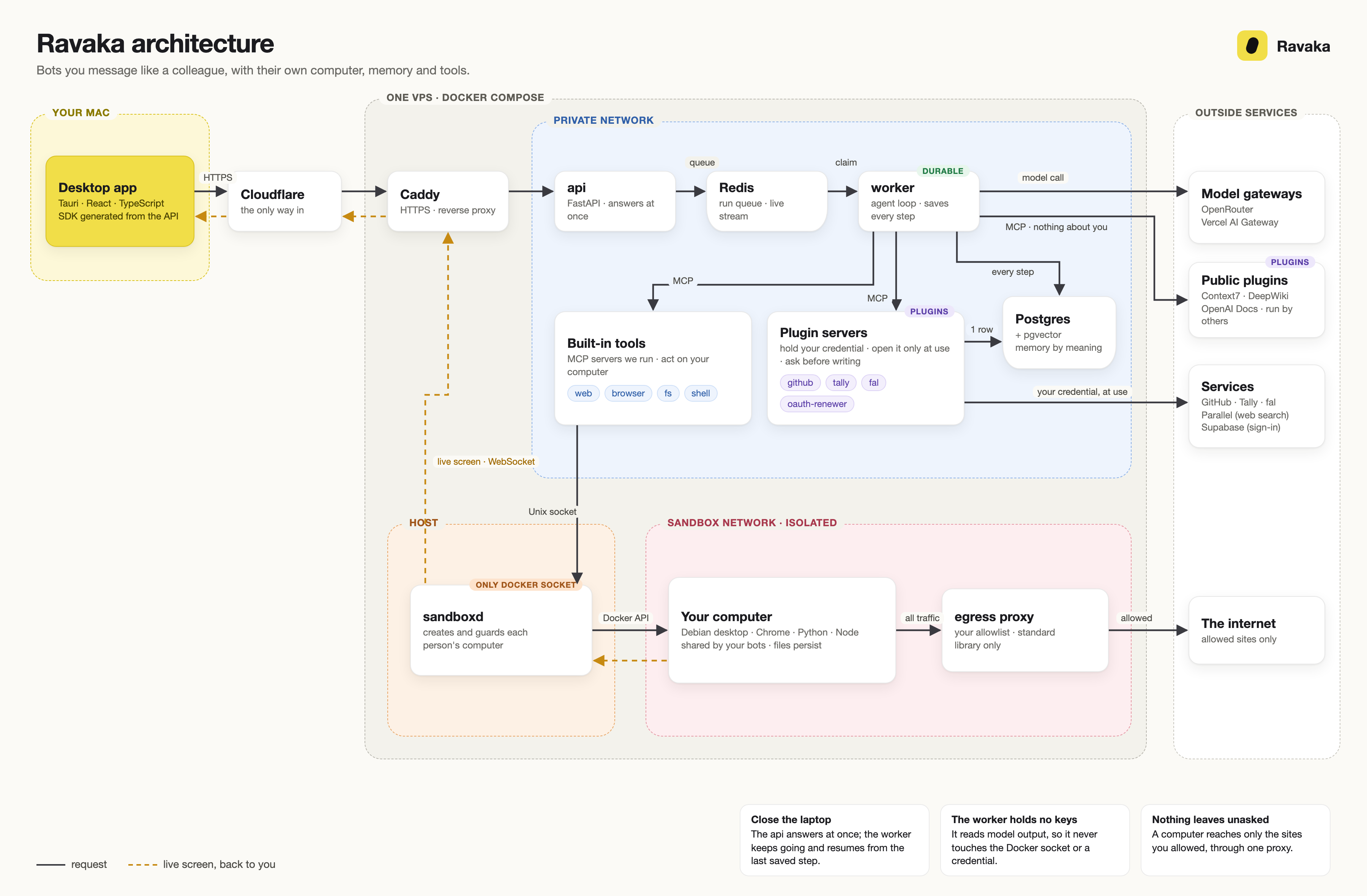
Solid arrows are requests; dotted arrows are the live screen coming back.
How one message travels
- The app sends your message through a client generated from the server's OpenAPI spec.
apisaves it, queues a run in Redis, and answers at once. You can close the laptop now.- A
workerruns the agent loop and saves every step to Postgres; if it dies, another resumes from the last step. - The model asks for a tool; the worker calls that tool server over MCP.
- The tool server acts on your computer through
sandboxd, or calls an outside service with your credential. - The reply streams back word by word (Server-Sent Events, through Redis).
Security boundaries
| From | To | Allowed? |
|---|---|---|
| Desktop | api | ✅ through Cloudflare and Caddy, the only public door |
worker | tool servers | ✅ private network, no published ports |
| Tool servers | sandboxd | ✅ Unix socket, never a network port |
worker | sandboxd or the master key | ❌ it reads model output, the least trusted input |
Anything but sandboxd | Docker socket | ❌ holding it equals root |
| Your computer | Postgres, Redis | ❌ different networks, no route |
| Your computer | Internet | ⚠️ only sites you allowed, through egress |
- A tool server is never told who you are: it gets a sandbox id, never a user id or token.
- Credentials are opened at the moment of use, by the 4 containers that need them (GitHub, Tally, fal, the OAuth renewer), each with a database role that reads one person's row.
- GitHub writes are narrow: GET anywhere, POST only to create an issue or a comment, and only after you approve.
- Each ❌ is a test that may not fail, also verified on the live server.
Build and deploy
- Change an API field and the desktop fails to compile, not in front of a user.
- The server runs the exact image CI tested; rolling back is
deploy.sh --tag <sha>, a download, not a rebuild.
Why separate repositories
- One owner of the Docker socket, checkable by reading one repo.
- A small blast radius: a bug in a tool server has no route to the database's main login.
- Different release speeds: the server deploys often; the desktop ships as a built app.
- Python and TypeScript joined by a generated contract, not by hand.