 SnapMind
Overview
SnapMind is a macOS desktop app that uses AI to make screenshots findable later, and it lives in the menu bar too. AI suggests a name, a category and tags for each capture, describes pictures that have no words, and works as an assistant you can ask about your whole library. Clustering similar captures and recommending related ones are coming later. You capture, give it a name and a folder in a few seconds, and months later you find it by its name, its tags, or the words inside the picture, from the app or from ⌘Space.
Screenshots are easy to take and hard to find. They pile up as "Screenshot 2026-08-03 at 09.12.44.png" in a folder nobody opens, and the thing you saved is gone the moment you need it.
Main Features
- Capture
- Region, window or full screen, from a button, the menu bar or a keyboard shortcut you choose
- Paste an image straight from the clipboard
- New captures wait in an Inbox, so you are never asked where to save at the moment you capture
- Filing
- Name, category, tags and the page it came from, in one short form
- Your recent folders are one click; the image file goes into your own folder, not a library SnapMind owns
- Suggest uses AI to fill in the name, category and tags; it reads the page too, when you give it one
- Finding
- Every capture's text is read on your Mac, so search finds the words inside the picture
- Filter by category, tag, due reminders or missing files
- Captures appear in ⌘Space (Spotlight); a click opens them in SnapMind
- Using it
- Copy the image, share it (AirDrop, Messages, Mail), drag it out as a file, or show it in Finder
- Open any capture full size
- Reminders
- Tonight, tomorrow, next week, or a day and time you pick
- macOS delivers the notification whether SnapMind is running or not
- AI, only when you ask
- Suggest: a name, category and tags for one capture
- Describe: one or two sentences for a picture with no words, such as a chart, which then becomes searchable
- Ask: a question about your library, answered with the captures it came from
- Nothing leaves your Mac until you press a button
- Looking after your files
- Removing a capture from the library never deletes your file
- A file moved outside SnapMind shows as missing, with a way to find it again
- The app
- Lives in the menu bar and can start with the Mac
- Light and dark, following the system
Structures
- 3 Repositories
- desktop
- contracts
- services/backend
Tech Stack & Libraries
A local-first macOS app: 3 repositories, one desktop app, one small backend.
The stack
| Layer | Built with |
|---|---|
| Desktop app | Tauri 2 (Rust) · React 19 · TypeScript 7 · Vite · Tailwind CSS 4 · shadcn/ui |
| Local data | SQLite through sqlx (Rust) and the Tauri SQL plugin |
| macOS | screencapture, and through objc2: Vision (text recognition), Core Spotlight, User Notifications, AppKit (share sheet, drag out) |
| Backend | Node.js · Express 5 · Zod 4 · linkedom (reads web pages) |
| AI models | Any model through OpenRouter, chosen by one setting |
| Shared types | @snapmind/contracts, one TypeScript package used by the app and the backend |
| Tests | Vitest and Testing Library; Rust tests against a real SQLite database |
Engineering highlights
- Local-first: the SQLite database on your Mac is the source of truth, and the app works with no network at all.
- Ready for sync from day one: IDs are made on the device, deleted rows are kept as tombstones, and every change writes a sync outbox row in the same transaction.
- Your files stay yours: captures are moved into your own folders, never copied, and removing one from the library never deletes the file.
- Measured, not guessed: library rows were drawing from full-size screenshots; small copies took memory for 13 captures from 208 MB to 3.4 MB.
- Private by design: nothing is sent to a model until you press a button; Ask says how many captures it will send before it sends them.
- Tested: 235 tests in the desktop app, 204 in the backend, and 112 Rust tests.
Architecture
The parts
| Repo | What it does | Where it runs |
|---|---|---|
desktop | The app: capture, Inbox, Library, reminders, Spotlight, sharing | Mac |
contracts | Shared TypeScript types and route names | Used by both |
services/backend | Suggest, Describe and Ask, and an agent loop that can read a web page | A server |
The map
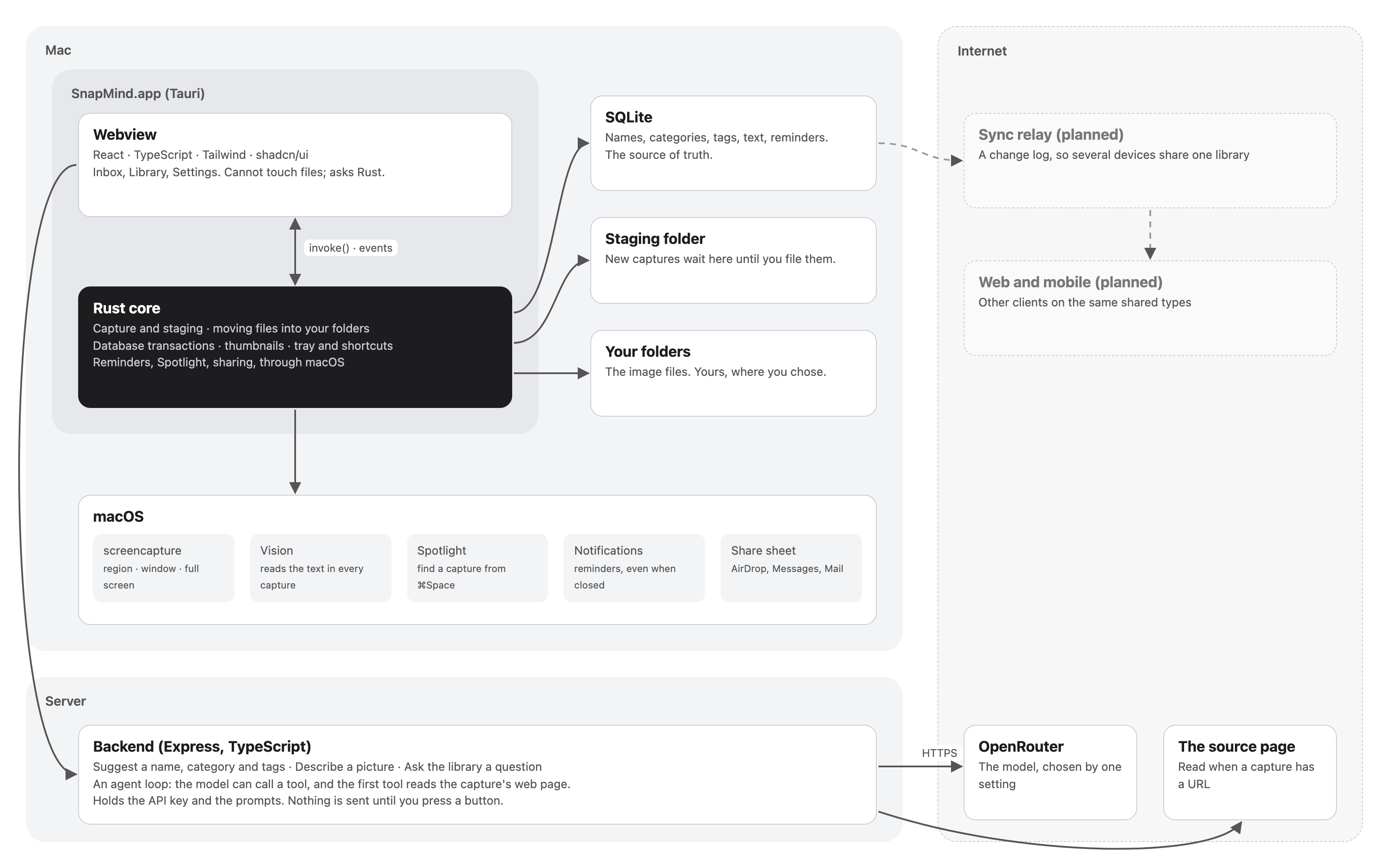
Solid arrows are built; dashed arrows are planned.
How one capture travels
- You press Region (or your shortcut). Rust runs
screencaptureand saves the image to a staging folder. - The capture appears in the Inbox.
- You file it. Rust moves the file into your folder, then saves its name, tags and file in one database transaction.
- macOS reads the text in the picture, and the capture is added to Spotlight.
- Months later you type a word from the picture, in the app or in ⌘Space, and it is there.
Why it is built this way
- Tauri rather than Electron: about 5 MB instead of about 120 MB, because it uses macOS's own web engine, with Rust for the parts that need the operating system.
- Transactions belong in Rust: the SQL plugin hands each statement whatever connection is free, so a transaction started from the webview would deadlock against itself.
- The AI lives on the backend: the key, the prompts and the checks on the model's answer stay in one place that other clients can reach later.
- Separate repositories with shared types: rename a field in
contractsand every repo that is now wrong fails to build.