 WritePost
Overview
Knowing what to post is often harder than making the post. This app starts from a topic and a platform, and the AI suggests ideas based on what is being talked about on the web right now. Pick one, and it writes a full content brief: the hook, the text for every slide, the visual direction, the caption and the call to action. Add a post you like as a reference, and the brief and image prompts follow its style.
Main Features
- Generate: choose the platform, the format (carousel, single image, video, story…), the topic and the category (how-to, tips, story…)
- Visual reference: attach a post you like, and optionally your own photo to use in it
- Ideas: five post ideas for the topic, based on a web search
- Content brief: the hook, the slide-by-slide text, the visual direction, the caption and the call to action
- Caption options: the caption's length, and an optional poll or question for the audience
- Image prompts: a full mockup prompt, a background-only prompt and a creation brief, ready for an image tool
How the AI works
- Ideas from the web: the AI searches the web (Exa) before it suggests ideas; for X, Grok uses X's own search.
- A model per platform: X goes to Grok (x-ai/grok-4.3); the other platforms go to GPT-5 mini. Both run through OpenRouter, so a model can be changed in one setting.
- Style from a reference post: a vision model (Gemini 2.5 Flash Lite) reads the reference post, and your photo if you add one, and describes its style; the brief and the image prompts then follow that style.
- Written for each platform: every prompt knows the platform and the format, for example a story gets overlay text and a poll instead of a feed caption.
Structures
- 2 Repositories
- the iOS app (Xcode project)
- the backend (FastAPI)
Tech Stack & Libraries
| Layer | Built with |
|---|---|
| App | Swift · SwiftUI · iPhone |
| Backend | Python · FastAPI · Uvicorn |
| AI | OpenRouter: GPT-5 mini, Grok 4.3, Gemini 2.5 Flash Lite |
| Web search | Exa · X Search |
Architecture
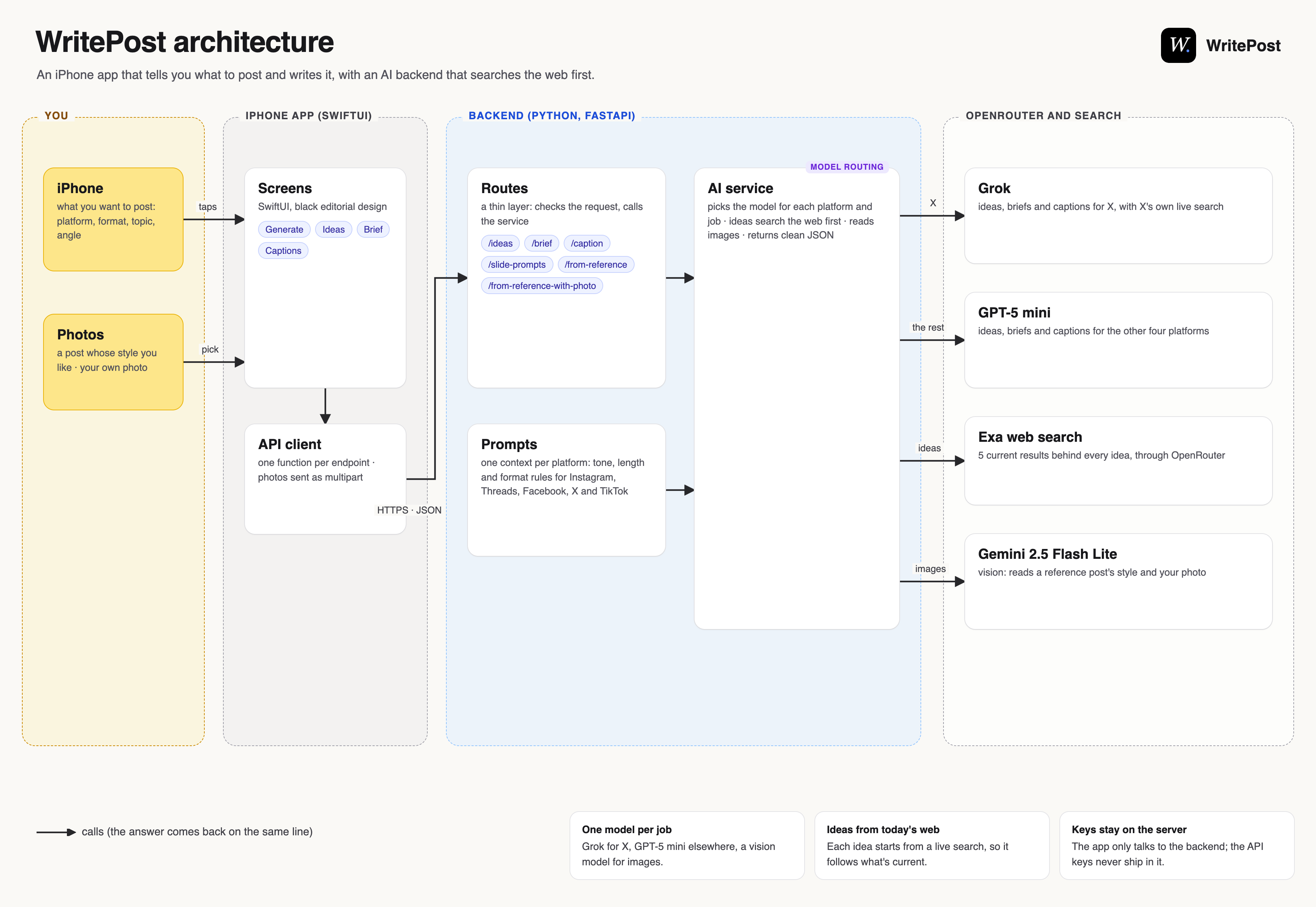
Solid arrows are calls, and the answer comes back on the same line; dashed arrows are sent on their own.